A few years ago, choosing an office laptop was relatively straightforward. You looked at the processor, RAM, storage, battery life and price.
Now there's another term appearing in laptop advertisements: AI PC.
Manufacturers are introducing laptops with dedicated artificial intelligence processors, promising smarter features and more efficient computing. Meanwhile, businesses are already using AI tools to write emails, analyse information, generate content and assist with software development.
But here's the question that matters to a business owner:
Do you actually need an AI laptop to use AI?
The answer is no.
Many popular AI applications work perfectly well on ordinary laptops because the heavy processing happens in the cloud.
However, certain newer AI features can benefit from specialised hardware.
Understanding the difference can help your business choose suitable equipment without spending money on capabilities employees may never use.
What Exactly Is an AI Laptop?
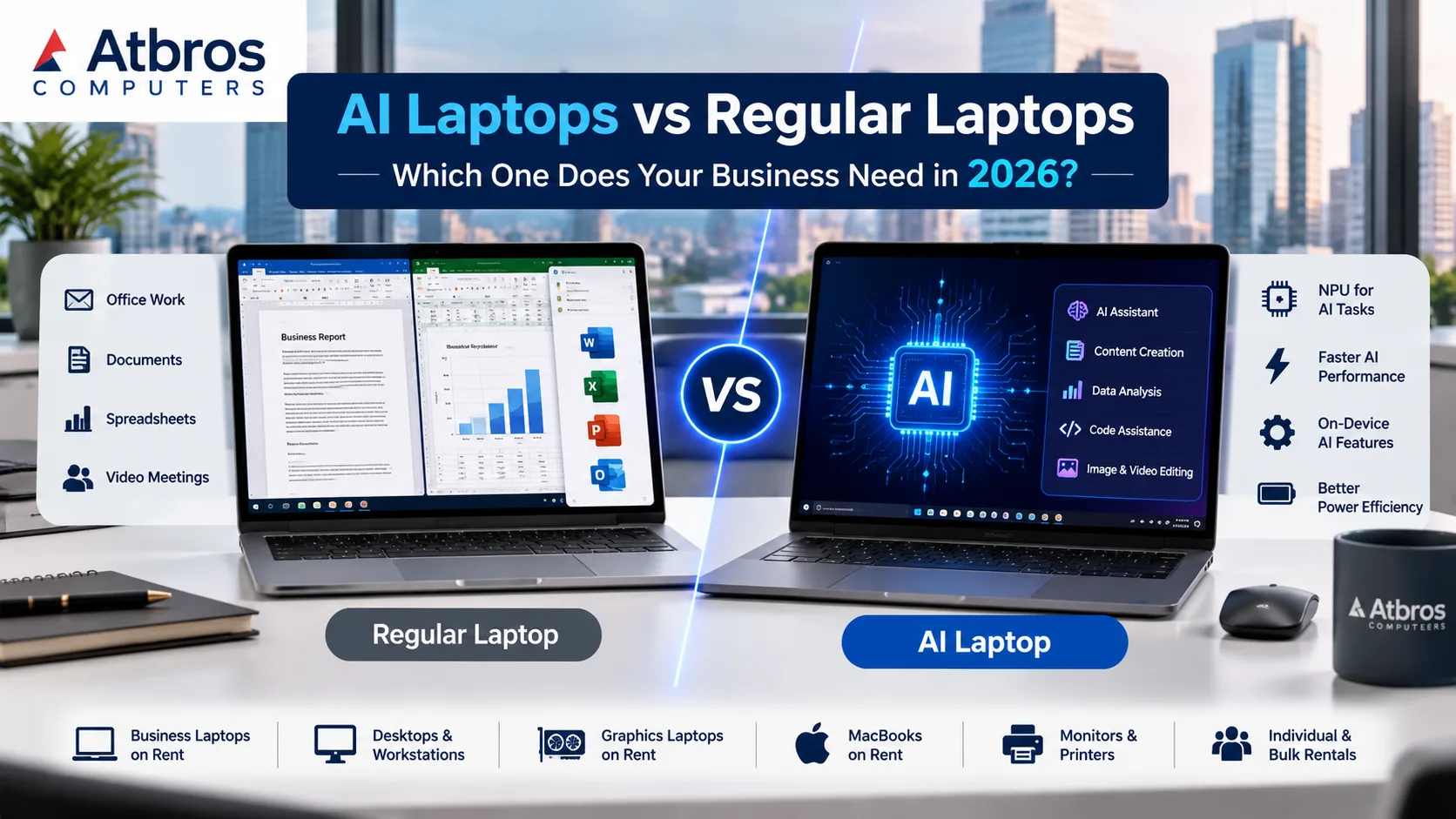
An AI laptop is a computer designed with hardware that can accelerate certain artificial intelligence workloads.
Many newer AI PCs include a component called an NPU (Neural Processing Unit).
Think of a laptop as having different specialists working together.
The CPU handles general computing tasks, such as opening applications, processing instructions and running business software.
The GPU handles graphics-intensive tasks and can also accelerate certain AI workloads.
The NPU is designed to perform supported AI operations efficiently, often using less power than running the same task on general-purpose processing hardware.
An AI laptop still performs normal computer tasks. Its dedicated AI hardware simply provides additional capabilities for applications designed to use it.
Can a Regular Laptop Run ChatGPT and Other AI Tools?
Yes.
This is one of the most important distinctions businesses should understand.
Popular cloud-based AI services can generally be accessed through a web browser or supported application on a compatible ordinary laptop.
For example, employees may use cloud AI tools for:
Drafting business emails and proposals
Summarising documents
Preparing marketing content
Assisting with spreadsheet formulas
Researching business topics
Writing or reviewing programming code
Generating ideas for presentations
These tasks do not automatically require an NPU-equipped computer.
The AI processing often happens on remote servers, while the laptop provides the interface.
However, local AI applications that process models directly on the device may benefit from more powerful CPUs, GPUs, NPUs and additional RAM.
AI Laptop vs Regular Laptop: What's the Difference?
FeatureRegular LaptopAI LaptopEveryday office applicationsYesYesCloud-based AI toolsYesYesDedicated NPUNot necessarilyCommon in modern AI PCsLocal AI accelerationDepends on hardwareDesigned for supported workloadsMicrosoft Office and browsersYesYesVideo meetingsYesYesSpecialised on-device AI featuresHardware-dependentMore likely to support themPurchase costWide rangeMay carry a premiumSuitable for business rentalYesDepends on requirements and availabilityThe key point is that an AI laptop is not automatically faster at every task.
Performance depends on the specific processor, RAM, storage, GPU, software and workload.
Which Employees Actually Need AI Laptops?
Different departments have different computing requirements.
1. Accounts and administration
Employees working with accounting software, invoices, spreadsheets, email and browser-based business applications may not need specialised AI hardware.
A properly configured Core i5 business laptop with sufficient RAM and SSD storage may be entirely suitable.
The more useful upgrade could be additional memory, faster storage or an external monitor.
2. Sales and marketing teams
Sales employees frequently work with presentations, CRM platforms, spreadsheets and video meetings.
Cloud-based AI tools can assist with content and communication without requiring a dedicated AI PC.
However, professionals using supported local AI features for media processing may benefit from newer hardware.
3. Software developers
Developers may use AI coding assistants, virtual machines, containers and development environments.
Some of these tools depend primarily on cloud services, while others place substantial demands on the local computer.
For many developers, sufficient RAM, processor performance and SSD capacity may matter more than the presence of an NPU.
Developers experimenting with local AI models should evaluate GPU capability, memory capacity and software compatibility.
4. Graphic designers and video editors
Creative professionals may need significantly more computing power than ordinary office employees.
Dedicated GPUs can be important for video editing, rendering, 3D modelling and AI-assisted creative workflows.
A graphics laptop or professional workstation may be more suitable than an entry-level AI laptop.
Explore graphics laptop rental options when evaluating hardware for demanding creative applications.
5. IT and AI development teams
Teams testing local AI models, machine learning applications or specialised AI software may benefit from high-performance systems.
However, an NPU alone does not guarantee compatibility with every AI framework.
GPU memory, system RAM, supported software libraries and processing capability should be reviewed carefully.
For some workloads, a powerful workstation may be a better choice than a thin-and-light AI laptop.
Does an AI Laptop Make Your Business More Productive?
Potentially, but productivity improvements come from using suitable software and workflows, not simply owning newer hardware.
Imagine a company purchasing AI laptops for fifty employees.
If most employees only use email, spreadsheets, accounting applications and browser-based CRM software, the additional AI hardware may deliver limited practical value.
Now consider a smaller technical team that uses supported on-device AI applications throughout the day.
For those employees, AI-capable hardware could offer meaningful benefits.
The important question is not whether the laptop has AI branding.
It is whether the software employees use can take advantage of the hardware.
Should Businesses Replace Their Existing Laptops in 2026?
Not necessarily.
Before replacing existing systems, consider three questions.
Are the current laptops meeting performance requirements?
If employees can complete their work efficiently and their systems meet security and software support requirements, an immediate replacement may not be necessary.
Are the computers compatible with supported operating systems?
Windows 10 reached the end of standard support on October 14, 2025. Businesses still using it should review upgrade options, compatible Windows 11 hardware and any applicable Extended Security Updates arrangements.
Will newer hardware solve a real problem?
If employees are struggling with insufficient RAM, slow storage or demanding applications, an appropriately configured replacement may help.
But a new AI laptop is not necessarily the correct solution to every performance issue.
Renting vs Buying AI Laptops: What Should Businesses Consider?
Technology changes quickly, and hardware decisions can become expensive when made for uncertain future requirements.
Buying may be suitable when a business has predictable long-term equipment needs and a clear ownership strategy.
Renting can be worth evaluating when a company needs equipment for a limited assignment, wants to test different configurations or is managing a changing workforce.
Consider a software company preparing to test an AI-enabled application.
Rather than immediately purchasing multiple expensive systems, it may be useful to evaluate the required specifications and rental options first.
Similarly, a creative agency working on a short-duration video project may need powerful graphics laptops for only a few months.
Atbros Computers handles rental enquiries for business laptops, graphics laptops, MacBooks, desktops and professional workstations.
Specific AI-capable models and configurations should be confirmed during the quotation process.
What Specifications Should You Look for in 2026?
There is no single ideal configuration for every business.
The following examples are starting points rather than universal minimum requirements.
Business requirementHardware to considerEmail, documentation and web applicationsSuitable Core i3/Core i5-class system, 8–16GB RAM, SSDMultitasking and larger spreadsheetsCapable Core i5/Core i7-class system, 16GB or more RAMSoftware developmentStrong CPU, 16–32GB RAM depending on toolsVideo editing and graphicsDedicated GPU, suitable CPU, 16–32GB or more RAMLocal AI experimentationCompatible GPU/NPU, sufficient RAM and model-specific supportProfessional engineering applicationsWorkstation-class configuration matched to softwareProcessor generations matter. A newer mid-range processor can outperform an older high-end processor in some tasks.
Likewise, software compatibility is essential, especially when considering newer ARM-based laptops.
Always verify the applications employees need before finalising a system.
What About MacBooks?
Apple Silicon MacBooks also include hardware designed to accelerate machine learning workloads.
However, software compatibility, operating system requirements and the particular AI application remain important considerations.
A MacBook may be suitable for development, design and professional workflows that benefit from macOS.
For Windows-specific business applications, a compatible Windows laptop may be the more practical choice.
Atbros Computers handles MacBook rental enquiries alongside Windows laptop and workstation requirements.
The Smarter Approach: Match Computers to Employees
A company does not need to purchase identical high-performance computers for every employee.
Instead, consider grouping users by actual requirements.
Administrative employees may need standard business systems.
Managers may prioritise portability and battery life.
Developers may need additional RAM and processing power.
Designers may require dedicated graphics hardware.
Specialised AI teams may need systems selected for their specific software and model requirements.
This role-based approach can help organisations avoid unnecessary specifications while providing capable equipment where it matters.
How Atbros Computers Can Help
Atbros Computers helps businesses explore computer rental options according to their operational needs.
Our rental enquiries cover:
Core i3, Core i5 and Core i7 business laptops
Desktop computers for offices and training
Graphics laptops for creative and technical work
MacBooks for compatible professional applications
Desktop and mobile workstations
Monitors, printers and related IT equipment
Individual, monthly and bulk computer rental requirements
Explore our laptop rental service or browse the available equipment categories.
Customers looking for specific AI-capable laptops should share the preferred model, processor, NPU/GPU requirements and intended applications so availability can be checked.
Frequently Asked Questions
What is the difference between an AI laptop and a normal laptop?
An AI laptop generally includes specialised hardware, such as an NPU, designed to accelerate supported AI workloads. A regular laptop can still run many AI tools, especially cloud-based applications.
Do I need an AI laptop to use ChatGPT?
No. ChatGPT and many other cloud-based AI services can be used on compatible regular laptops with an internet connection.
Is an AI laptop better than a Core i7 laptop?
Not automatically. Core i7 is a processor branding category, while AI PC refers to certain hardware capabilities. Overall performance depends on the specific processor generation, RAM, GPU, storage and workload.
Can AI laptops run Microsoft Office?
Yes, provided the operating system and Office version are compatible.
Do graphic designers need AI laptops?
Not necessarily. Designers should prioritise the requirements of their software, including GPU capability, RAM and display quality. Some AI features may benefit from dedicated acceleration.
Is renting a laptop better than buying one?
It depends on the expected usage period, specifications, rental terms and total cost. Rental can be useful for temporary projects and changing equipment requirements, while purchasing may suit long-term predictable use.
Can businesses rent laptops for AI development?
Businesses can enquire about graphics laptops and workstations suitable for development workloads. Hardware suitability and availability depend on the particular AI applications and model requirements.
Should a company upgrade all its computers in 2026?
A company should first review performance, operating system support, security, software compatibility and employee requirements. Replacing every computer at once may not be necessary.
Don't Buy the AI Label. Choose the Right Computer On Rent.
AI laptops are an important development in personal computing, but they are not a universal requirement for every business.
For everyday office applications, a properly configured regular laptop may remain an excellent choice.
For supported on-device AI features, specialised development and demanding creative workloads, newer AI-capable hardware or powerful workstations may offer advantages.
The best decision comes from understanding what employees actually do.
Need laptops, desktops, MacBooks or workstations for your business?
Contact Atbros Computers with your software requirements, preferred specifications, quantity and rental duration for a customised rental quotation.
Atbros Computers — Work Smarter, Rent Better.