Choosing laptops for employees is not simply about selecting the fastest processor available. A customer support executive, accountant, software developer and graphic designer all use computers differently. Providing every employee with the same laptop configuration can result in unnecessary expenses or performance limitations.
When businesses consider laptop rentals, one of the most common questions is: Should we rent Core i3, Core i5 or Core i7 laptops for our team?
The answer depends on the applications employees use, how many tasks they perform simultaneously, the amount of memory required and the expected rental duration.
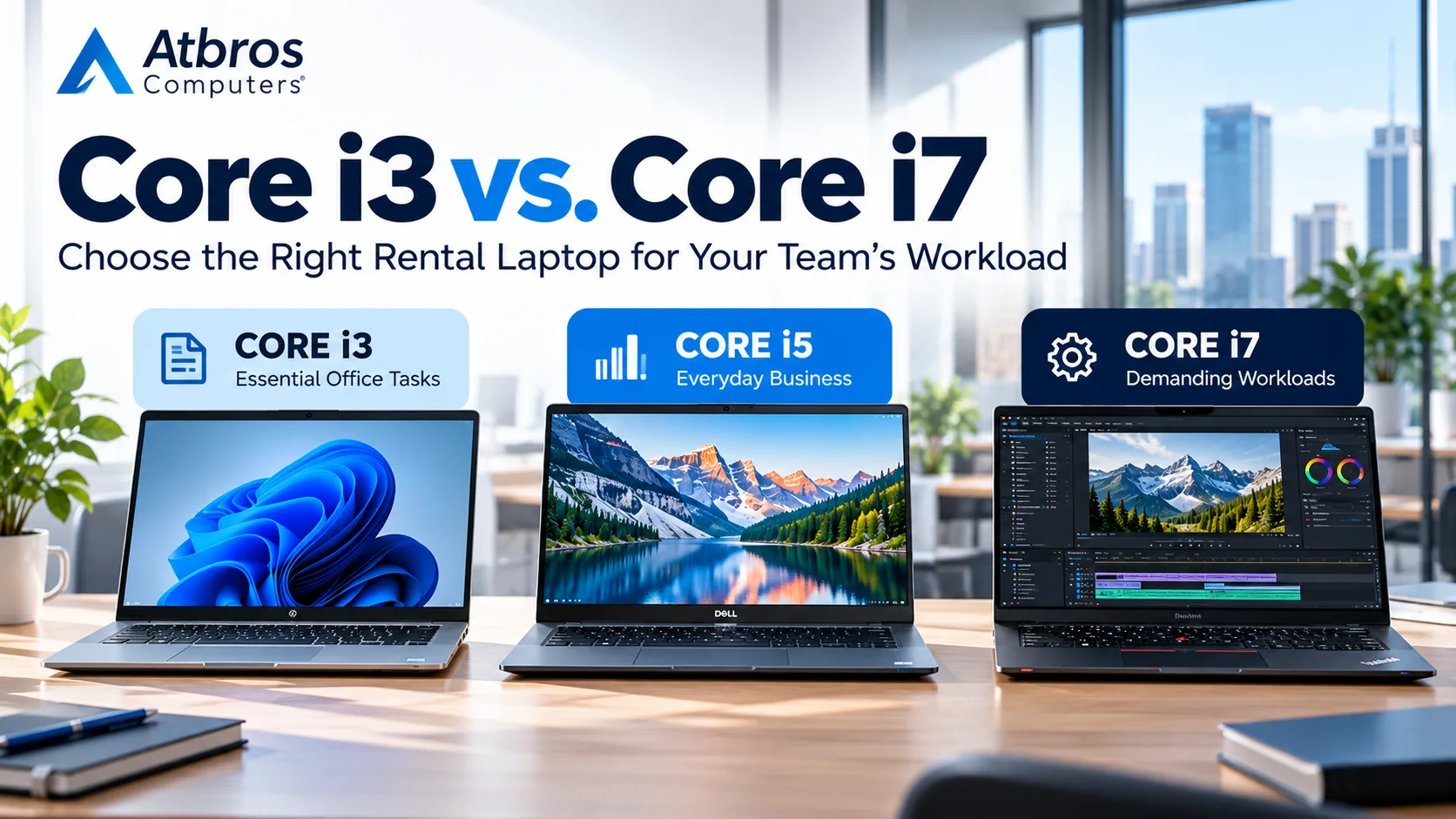
An Intel Core i3 laptop can be suitable for routine administrative work. A Core i5 laptop often provides a practical balance between performance and cost for everyday professional use. A Core i7 laptop may be more appropriate for demanding development environments, complex calculations and heavier workloads.
However, processor generation and the complete system configuration matter just as much as the Core i3, i5 or i7 label.
At Atbros Computers, we help businesses, startups, IT companies, educational institutes and professional teams select laptop rental configurations according to their actual work requirements.
Whether you need five laptops for a new office, fifty systems for employee onboarding or specialised computers for a technical project, this guide will help you make an informed choice.
Core i3 vs. Core i5 vs. Core i7: Understanding the Difference
Intel Core i3, Core i5 and Core i7 are processor families commonly found in business and personal laptops.
Historically, these names have represented different performance tiers within Intel's product ranges.
However, the processor name alone does not tell you how fast a laptop will be.
A newer-generation Core i5 processor can outperform an older Core i7 in some workloads. Performance also depends on the specific processor model, laptop cooling system, memory and power limits.
Intel has also introduced newer naming conventions, including Core and Core Ultra processors. Therefore, businesses should compare actual processor models rather than relying exclusively on familiar labels.
Quick comparison of Core i3, Core i5 and Core i7 laptops
FeatureCore i3Core i5Core i7Typical positioningEntry-level productivityMainstream business performanceHigher-performance workloadsOffice applicationsSuitableSuitableSuitableEmail and browsingSuitableSuitableSuitableVideo meetingsSuitableSuitableSuitableModerate multitaskingConfiguration-dependentGenerally suitableGenerally suitableSoftware developmentBasic projectsMany development workloadsMore demanding projectsLarge data processingLimited by configurationModerate to demandingOften preferable for heavier tasksGraphics applicationsBasic tasksDepends on GPUDepends on GPURelative rental costUsually lowerMid-rangeUsually higherActual capabilities vary by processor generation, RAM, SSD, GPU and laptop model.
For many companies, the most cost-effective solution is not choosing one processor category for everyone. It is selecting different laptop specifications for different departments.
When Should Your Business Rent a Core i3 Laptop?
Core i3 laptops are generally suitable for employees who use standard office applications and do not regularly perform resource-intensive tasks.
They can be a cost-conscious option for temporary staff, administrative departments and organisations with straightforward computing requirements.
Common business tasks suitable for Core i3 laptops
Email communication and web browsing
Microsoft Word and basic Excel spreadsheets
Google Workspace applications
Online meetings and video calls
Data entry and documentation
Browser-based CRM applications
Billing and routine accounting
Basic inventory management
A Core i3 laptop with an SSD and sufficient RAM can provide a responsive experience for many everyday tasks.
Recommended Core i3 rental configuration
For routine office use, consider the following starting specifications:
ComponentSuggested configurationProcessorSuitable-generation Intel Core i3RAM8GB minimum; 16GB for heavier multitaskingStorage256GB SSD or higherDisplay14-inch or 15.6-inchOperating systemWindows version compatible with your softwareBest suited forAdministrative and basic office workThese are starting recommendations, not universal minimum requirements.
Example: Laptop rental for a customer support team
Imagine a company hiring twenty customer support executives.
Their daily responsibilities include responding to emails, accessing a web-based CRM, using a calling application and preparing basic reports.
If the software runs efficiently on a modern Core i3 configuration, renting Core i7 laptops for every employee may not provide a meaningful productivity benefit.
Instead, the company could allocate its hardware budget toward adequate RAM, SSD storage, comfortable displays and dependable support.
When Core i3 may not be enough
A Core i3 laptop may be less suitable when employees regularly run virtual machines, complex development environments, large analytical workloads or demanding professional applications.
In those situations, a Core i5 or Core i7 system may offer better value.
Why Core i5 Laptops Are Popular for Business Rentals
Core i5 laptops often occupy the middle ground between entry-level affordability and higher-performance computing.
They are frequently a practical choice for companies with employees performing varied tasks throughout the working day.
A suitable Core i5 laptop can handle routine office work while providing additional performance for moderate multitasking and more demanding business applications.
Which employees benefit from Core i5 laptops?
Core i5 laptops can be appropriate for:
Sales and marketing professionals
HR and recruitment teams
Accounts and finance departments
Project coordinators
Business analysts
Web developers
Operations managers
Employees using multiple business applications
Recommended Core i5 rental configuration
ComponentSuggested configurationProcessorSuitable-generation Intel Core i5RAM16GB preferred for multitaskingStorage256GB–512GB SSDDisplay14-inch or 15.6-inchGraphicsIntegrated graphics for standard business tasksBest suited forGeneral professional workloadsFor employees who regularly keep numerous browser tabs, spreadsheets, communication tools and business applications open, 16GB RAM can be a worthwhile consideration.
Example: Choosing laptops for a growing startup
Consider a startup with thirty employees working across sales, operations, finance, customer service and development.
Rather than assigning expensive laptops to everyone, the company can divide its hardware requirements into groups.
Customer service employees may use Core i3 laptops.
Sales, finance and operations teams may use Core i5 systems.
Developers and specialised users may receive higher-performance configurations.
This approach helps the organisation match rental spending to employee needs.
Atbros Computers handles mixed hardware rental requirements for businesses with different departments and technical needs.
Explore our laptop rental services for business laptop requirements.
When Should You Rent a Core i7 Laptop?
Core i7 laptops are commonly considered for employees who perform demanding computational tasks or use several resource-intensive applications.
They can be useful when processing performance affects productivity and project delivery.
However, the exact processor model and generation must be evaluated.
A laptop with a Core i7 processor but insufficient RAM or poor cooling may perform worse than expected.
Professional workloads that may benefit from Core i7
Core i7 laptops may be suitable for:
Complex software development projects
Multiple virtual machines
Large spreadsheet calculations
Data processing and analytical applications
Resource-intensive development environments
Engineering software
Selected content creation workflows
Demanding multitasking
Some of these tasks may benefit more from additional RAM, faster storage or a dedicated GPU than from moving to a higher CPU tier.
Recommended Core i7 rental configuration
ComponentSuggested configurationProcessorSuitable-generation Intel Core i7RAM16GB–32GB or more, based on applicationsStorage512GB SSD or higherGraphicsIntegrated or dedicated, depending on softwareDisplayAccording to user requirementsBest suited forDemanding professional applicationsExample: Laptop rental for a software development team
Suppose a software company requires fifteen laptops for developers.
The team uses an IDE, local databases, containers, browser testing tools and several background applications.
A modern Core i5 system with 16GB RAM may be sufficient for some developers.
Others may benefit from Core i7 processors and 32GB RAM, especially when running multiple virtual machines or large local development environments.
Rather than selecting laptops by job title alone, the company should identify the tools and workloads each developer uses.
This produces a more accurate rental requirement.
Does a Core i7 Laptop Always Perform Better Than a Core i5?
Not necessarily.
This is one of the most important points to understand before renting laptops.
Intel processors differ by generation, architecture, power consumption, core configuration and laptop implementation.
For example, a newer Core i5 processor may offer better performance in certain tasks than an older Core i7 processor.
The performance of a laptop can also be influenced by:
Processor generation and exact model
Number and type of CPU cores
Laptop cooling capacity
Power limits
RAM capacity and memory configuration
SSD performance
Background applications
Operating system and software requirements
Why processor generation matters
A Core i7 processor from several years ago should not automatically be treated as superior to a recent Core i5 processor.
When comparing rental quotations, request the processor model or generation wherever possible.
This makes it easier to evaluate the hardware being offered.
How Much RAM Does Your Team Actually Need?
RAM is one of the most important laptop specifications for business productivity.
Even a capable processor can feel slow if the laptop does not have enough memory for the applications running simultaneously.
Is 8GB RAM enough for office work?
For basic email, browsing, document editing and light business applications, 8GB RAM may be sufficient.
However, employees using several applications and numerous browser tabs may benefit from 16GB.
Is 16GB RAM the best option for business laptops?
For many professional workloads, 16GB RAM is a practical choice.
It provides additional room for multitasking, business software and moderate development applications.
Who needs 32GB RAM or more?
Higher memory capacities may be appropriate for employees working with:
Multiple virtual machines
Large software development projects
Extensive datasets
Memory-intensive engineering applications
Advanced editing and production tools
Complex technical workflows
Before selecting a configuration, review the recommended memory requirements of the applications your employees use.
SSD Storage: Why It Matters for Laptop Rentals
Processor performance is only one part of the user experience.
Storage technology can also make a significant difference.
An SSD generally provides faster system startup, application loading and file access than a traditional mechanical hard drive.
For most modern business laptop rentals, SSD storage is preferable.
How much SSD storage should you choose?
256GB SSD: Often suitable for routine office work and cloud-based applications.
512GB SSD: A useful choice for developers, professionals and employees who store larger local files.
1TB SSD or higher: May be appropriate for large projects, media files, technical datasets and specialised applications.
Remember that cloud storage and company file-sharing systems can also affect how much local storage employees require.
Core i3 vs. Core i7 for Different Departments
Different teams have different computing requirements.
The following table provides a starting point for assigning laptop categories according to common business workloads.
Department or roleSuggested starting pointRAMReception and administrationCore i38GBCustomer supportCore i3 or Core i58GB–16GBSales and marketingCore i516GBHR and recruitmentCore i3 or Core i58GB–16GBAccounts and financeCore i516GBProject managementCore i516GBWeb developmentCore i516GBAdvanced software developmentCore i5 or Core i716GB–32GB+Data analysisCore i5 or Core i716GB–32GB+Graphic designApplication-dependent CPU and GPU16GB–32GB+Video editing and 3D workHigher-performance CPU and GPU32GB+ where neededThese are general recommendations. Actual requirements depend on the specific applications, datasets and employee workflows.
Core i3 vs. Core i7 for Software Development
Software development is not a single workload.
A developer working on a small website has different requirements from someone running multiple containers, virtual machines or large development environments.
Basic web development
For lightweight web development, a modern Core i5 laptop with 16GB RAM may be a practical starting point.
Some less demanding projects may run comfortably on Core i3 systems.
Application development
Developers working with large IDEs, local databases and multiple services may benefit from higher-performance processors and additional memory.
Virtual machines and containers
When employees run several virtual machines or containerised services, RAM capacity becomes especially important.
A Core i7 laptop with insufficient memory may not be as useful as a well-configured system with more RAM.
macOS development
Certain Apple-platform development workflows require macOS.
For those requirements, businesses may need to consider MacBook rentals rather than Windows laptops.
Atbros Computers also handles MacBook rental enquiries for professional teams.
Do Graphic Designers Need Core i7 Laptops?
Not every graphic designer needs a Core i7 laptop.
The appropriate hardware depends on the applications and complexity of the projects.
A designer creating social media graphics may have different requirements from a professional working on complex 3D scenes.
Graphic design and image editing
For many standard design tasks, a capable Core i5 laptop with adequate RAM may be sufficient.
Video editing
Video editing performance depends on several components, including the processor, GPU, RAM, storage and media formats.
3D modelling and rendering
Some 3D workflows benefit significantly from dedicated graphics cards.
In these situations, a graphics laptop or professional workstation may be more suitable than a conventional Core i7 business laptop.
Explore our graphics laptop rental service for specialised creative and technical requirements.
Integrated Graphics vs. Dedicated Graphics
When selecting rental laptops, businesses should consider whether employees need a dedicated GPU.
Integrated graphics
Integrated graphics are generally suitable for everyday office applications, video conferencing, document work and many routine business tasks.
Dedicated graphics
Dedicated GPUs can be useful for compatible applications involving 3D modelling, GPU rendering, video production and certain engineering workloads.
A Core i7 laptop without a dedicated GPU may not be the best choice for a graphics-intensive application.
Similarly, a Core i5 laptop with a suitable dedicated GPU may outperform it in certain graphics tasks.
The software requirements should guide the decision.
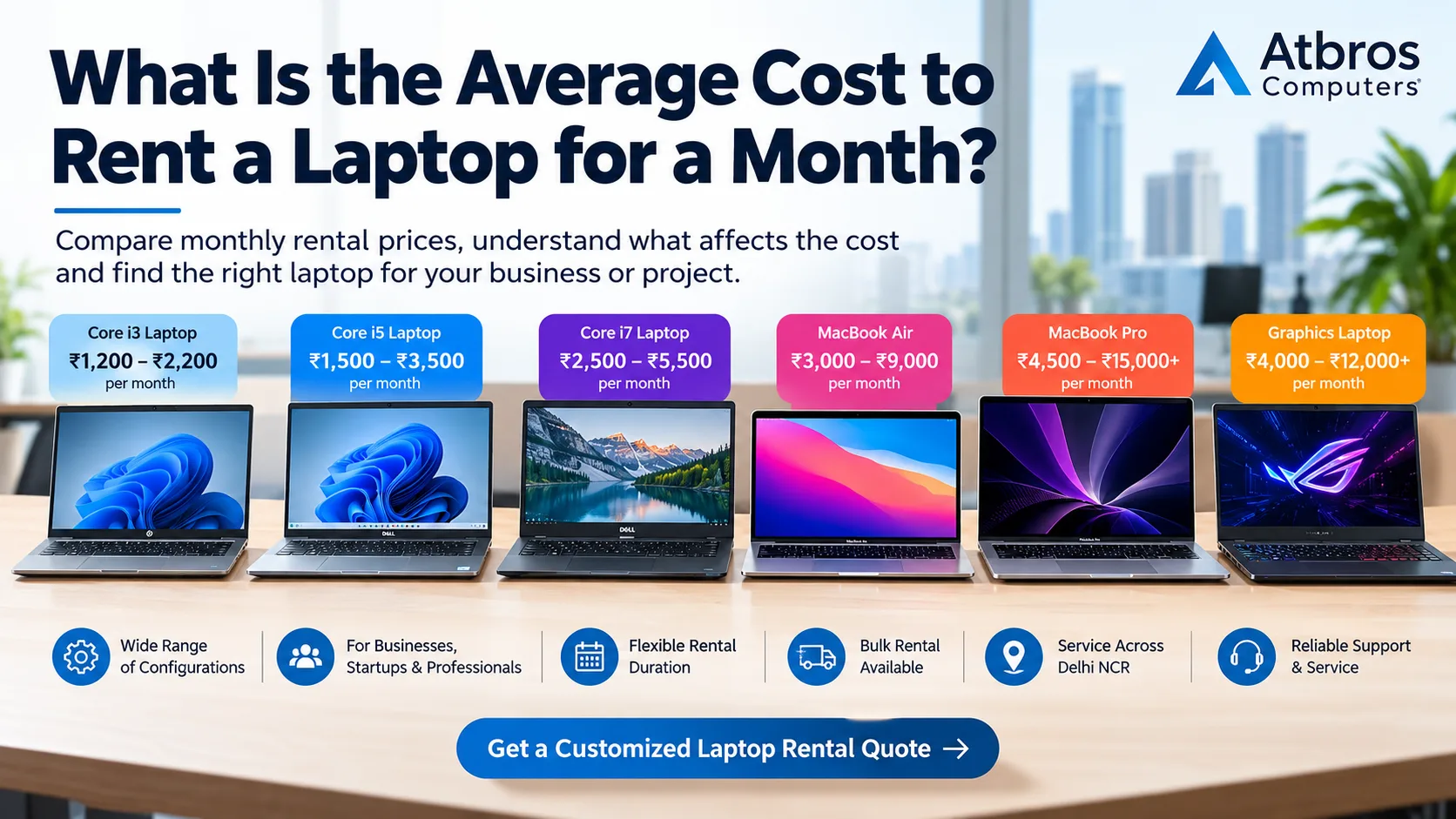
How Processor Choice Affects Monthly Laptop Rental Cost
Higher-performance laptops often have higher rental charges, although the exact amount depends on their generation, model and configuration.
For illustration, consider these broad monthly budgeting estimates:
Laptop categoryIndicative monthly rentalCore i3 business laptop₹1,200–₹2,200Core i5 business laptop₹1,500–₹3,500Core i7 business laptop₹2,500–₹5,500Graphics laptop₹4,000–₹12,000+These are illustrative market estimates, not confirmed Atbros Computers rates. Actual quotations depend on specifications, quantity, duration and terms.
Why the most expensive laptop is not always the best choice
Suppose a company has forty employees.
Thirty employees use routine business applications, while ten work on demanding development projects.
Providing Core i7 laptops to all forty employees could increase rental costs without providing equivalent benefits to every user.
A more practical approach may be to assign Core i5 systems to the general business team and higher-performance laptops to employees who genuinely need them.
This allows the company to allocate its budget according to actual requirements.
Example: Planning Laptop Rentals for a 50-Employee Office
Imagine a business setting up an office for fifty employees.
Its workforce includes:
15 customer support executives
15 sales and operations employees
10 software developers
5 finance and administrative employees
5 design and technical employees
Instead of requesting fifty identical laptops, the company can create a department-wise hardware plan.
Suggested hardware allocation
TeamQuantityStarting configurationCustomer support15Core i3, 8GB RAM, SSDSales and operations15Core i5, 16GB RAM, SSDSoftware development10Core i5/Core i7, 16GB–32GB RAMFinance and administration5Core i5, 16GB RAM, SSDDesign and technical5Application-specific graphics laptopsThis approach offers several advantages.
Employees receive hardware suited to their work.
The business avoids paying for unnecessary performance.
IT teams can plan configurations by department.
Hardware requirements become easier to communicate when requesting a rental quotation.
Atbros Computers handles bulk laptop rental enquiries involving multiple configurations and business departments.
How to Choose Rental Laptops for Remote and Hybrid Teams
Remote and hybrid employees may require different laptop features from staff working entirely in an office.
Battery life, portability, camera quality, wireless connectivity and display size can become important considerations.
For employees who travel frequently
Lightweight business laptops with practical battery life may be preferable to heavy high-performance systems.
For home-based employees
A comfortable display, sufficient RAM and dependable video-conferencing performance can improve daily usability.
For technical employees
Performance requirements may take priority over portability, particularly when employees run demanding applications locally.
When requesting laptops for remote teams, include the employee locations and any required accessories.
Renting Laptops for Training Institutes
Training institutes often need multiple computers with consistent specifications.
The appropriate hardware depends on the course being delivered.
Basic computer training may require only entry-level laptops.
Programming courses may benefit from Core i5 systems with additional RAM.
Graphics, animation and technical courses may require dedicated GPUs.
Why course duration matters
Some training programs last only a few weeks, while others continue for several months.
Rental arrangements allow institutes to request equipment for a defined training period.
Atbros Computers handles laptop and computer rental requirements for educational and professional training environments.
Laptop Rental for Temporary Employees and Projects
Temporary hiring can create short-term IT hardware requirements.
Businesses may need laptops for contract employees, consultants, interns or seasonal teams.
Purchasing new computers for every temporary employee may not always be the most practical option.
Renting provides an alternative that can be evaluated against the expected project duration and total cost.
When planning a rental, consider whether employees need standard office laptops or higher-performance systems.
Also clarify the return process, support arrangements and any extension requirements.
Should You Rent the Same Laptop Model for Every Employee?
Standardizing laptop models can simplify IT administration.
It may make software installation, troubleshooting and device replacement more consistent.
However, complete standardization is not always the most cost-effective solution.
A better approach for many businesses is to establish a few approved hardware profiles.
Example: Three laptop profiles
Profile A — Essential Office Laptop
For administration, documentation and basic business applications.
Suggested starting point: Core i3, 8GB RAM and SSD.
Profile B — Professional Business Laptop
For sales, finance, operations, management and general professional work.
Suggested starting point: Core i5, 16GB RAM and SSD.
Profile C — Performance Laptop
For development, advanced analytical work and specialised applications.
Suggested starting point: Core i7 or another suitable high-performance processor, 16GB–32GB RAM and SSD.
Graphics-intensive users may require a fourth profile with a dedicated GPU.
This structure makes bulk rental planning more organised.
Common Mistakes Businesses Make When Choosing Rental Laptop Specifications
Choosing laptops only by processor name
A Core i7 label does not automatically mean a laptop is suitable for every demanding application.
Always consider the exact processor model and other specifications.
Ignoring RAM requirements
Insufficient RAM can affect multitasking even when the processor is capable.
Renting graphics laptops without checking GPU requirements
Different professional applications have different graphics requirements.
Confirm the GPU model and memory needed by the software.
Selecting unnecessarily expensive configurations
Providing high-performance systems to employees who only use basic applications can increase rental expenses without a meaningful productivity benefit.
Not considering the rental duration
Short-term and long-term requirements may have different commercial implications.
Forgetting delivery and support arrangements
The rental price is only one part of the overall requirement.
Businesses should also clarify configuration, delivery, support and return terms.
A Practical Checklist Before Requesting a Laptop Rental Quote
Before contacting a rental provider, prepare the following information:
Number of laptops: Total quantity and department-wise allocation
Processor preference: Core i3, Core i5, Core i7 or another suitable processor
RAM: 8GB, 16GB, 32GB or application-specific requirements
Storage: Preferred SSD capacity
Graphics: Integrated or dedicated GPU requirements
Operating system: Windows, macOS or another required platform
Rental duration: Expected start and end dates
Delivery location: Office, project site or employee locations
Software: Important applications and minimum system requirements
Additional requirements: Monitors, keyboards, accessories or technical support
Providing these details helps the rental provider prepare a more relevant quotation.
Laptop Rental Services in Delhi NCR
Atbros Computers handles computer and laptop rental requirements for businesses in Delhi NCR, including Noida, Greater Noida, Ghaziabad and Delhi.
Whether your company needs standard office laptops, developer systems or graphics-enabled computers, our team can help you discuss suitable configurations.
Businesses looking for computer rental services in Ghaziabad can explore the relevant service page.
You can also browse our service locations for additional coverage information.
For companies with multiple offices, share the location-wise hardware quantities and preferred specifications when requesting a quotation.
Why Choose Atbros Computers for Business Laptop Rentals?
Atbros Computers provides computer rental solutions for different types of business and professional requirements.
Our hardware offerings include business laptops, desktop computers, MacBooks, graphics laptops, gaming laptops and professional workstations.
We understand that a single laptop specification does not work equally well for every employee.
A customer support executive may need a dependable office laptop.
A developer may require additional RAM and processing performance.
A designer may need dedicated graphics hardware.
A growing organization may require a combination of all three.
Atbros Computers helps customers plan rental requirements according to their actual workloads, quantities and preferred rental periods.
Whether you need one laptop or hundreds of systems, we welcome your hardware rental enquiry.
Frequently Asked Questions About Core i3, Core i5 and Core i7 Laptop Rentals
Is Core i3 enough for office work?
Yes. A suitable-generation Core i3 laptop with adequate RAM and SSD storage can handle many everyday office tasks, including email, documentation, browsing and basic business applications.
Is Core i5 better than Core i3 for business use?
Core i5 processors generally offer a higher performance tier within comparable generations, making them useful for moderate multitasking and professional applications. Actual performance depends on the specific models.
Should software developers rent Core i5 or Core i7 laptops?
It depends on the development environment. Many development tasks work well on modern Core i5 systems with sufficient RAM. More demanding workloads may benefit from Core i7 processors or higher memory capacities.
Does Core i7 always mean faster performance?
No. Processor generation, model, cooling, power limits and other hardware components affect performance. A newer Core i5 can outperform an older Core i7 in certain tasks.
Is 8GB RAM enough for a rental laptop?
8GB may be sufficient for basic office work. For employees using several applications simultaneously, 16GB is often a more comfortable starting point.
Is 16GB RAM necessary for Core i5 laptops?
Not always, but it is a practical choice for many professional workloads, particularly when employees use multiple business applications.
Can a Core i3 laptop handle Zoom or Microsoft Teams?
A suitably configured Core i3 laptop can handle common video-conferencing applications. Performance depends on the device generation, RAM, camera, network connection and other running software.
Do graphic designers need Core i7 laptops?
Not necessarily. The best configuration depends on the design applications. Some workflows benefit more from a dedicated GPU, additional RAM or faster storage than from a higher CPU tier.
Which laptop is best for fifty employees?
There is no single best configuration for every employee. Businesses should assess department-wise workloads and consider a combination of Core i3, Core i5, Core i7 and specialised systems.
Can I rent laptops with different specifications in one order?
Businesses can request a mixed hardware quotation based on different employee roles and departmental requirements.
What is the monthly rental cost of a Core i7 laptop?
A conventional Core i7 business laptop may fall within an illustrative range of ₹2,500 to ₹5,500 per month, although actual pricing varies by model, generation, configuration and rental terms.
Is renting laptops better than purchasing them?
Renting may be useful for temporary projects, uncertain staffing requirements and short-term equipment needs. Purchasing may be preferable for long-term ownership. Compare total costs over the intended usage period.
Get the Right Laptop Specifications for Your Team
Choosing between Core i3, Core i5 and Core i7 laptops should begin with understanding what your employees actually do.
For routine office work, a Core i3 laptop may be sufficient.
For everyday professional applications and moderate multitasking, a Core i5 laptop can provide a useful balance between performance and cost.
For demanding development, analytical and technical workloads, a Core i7 or another appropriately configured high-performance system may be the better choice.
The most effective rental strategy is to match processor performance, RAM, SSD capacity and graphics hardware to the workload rather than selecting specifications based on price or processor branding alone.
Planning laptop rentals for your office, startup, development team or corporate project?
Atbros Computers can help you arrange business laptops, MacBooks, graphics laptops and other IT equipment according to your requirements.
Share your department-wise quantity, preferred configurations, rental duration and delivery location.
Visit Atbros Computers to explore our rental solutions and request a customized quotation.
Atbros Computers — Work Smarter, Rent Better.